
 en
en de
de fr
fr

Screenshots
Download Installer
User Manual
Support
Bug Tracking
Mailing List
Add-Ons
Address Update
FAQ
This is an old revision of the document!
Pre-release date:
More bug fixes and functional changes + a couple of interesting new features.
The payment dialog had a lot of troubles, some more serious than others. This has led in some cases to missing or wrong ledger entries, which can disturb the practice's internal accounting. 7 tickets related to that subject have been fixed.
GECAMed comes out of the box with a fixed set of filters for the patient history ('Full View', 'Diagnosis', 'Letters', 'Files', 'Prescriptions', 'Forms', 'CDA'). Additional ad hoc filter criteria can be entered like the type of document, a date range and a text search criteria. However, those ad hoc filters could not be saved until now, and no additional filters could be added.
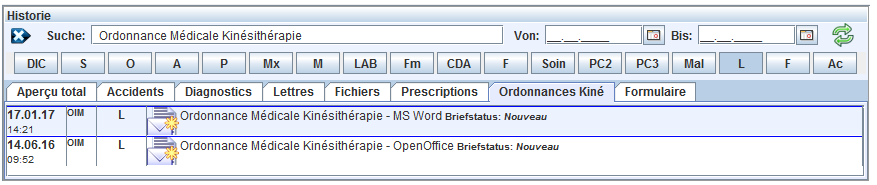
To get rid of these shortcomings, release 2.07.00 introduces fully customizabe filters for the patient history. Doctors can now define their own filters based an a type selection and a text criteria. Full management of all filters, comprising the standard ones, is now possible for a user with admin rights.
I. e., here you can see how a custom filter for the new “Ordonnances Médicales Kinésithérapie” would look like:
Until now the invoice trash could not be emptied, except with a series of DELETE operations on the DB. Now there is a user level function to do exactly this.
Users have complaint that the GECAMed internal Patient ID is displayed in several places. Now there is an option to hide it again.
Bank accounts for physicians and the practice can not be deleted once they have been used in a settlement. This new feature allows to hide them in the payment dialog, so that unused or obsolete accounts won't bother anymore during settlement operations.
(1) “CDA” and “Accident” default filters are missing. To test: in the usermangement.setting table remove the following part in the default settings XML for ID = -1 (see below) and open / close the filter config dialog.
<void method="put">
     <string>HISTORY_TABS</string>
     <string>Vollansicht;true;0;
Diagnosen;true;1;soap.a:
Briefe;true;2;letter:
Dateien;true;3;file
Verschreibungen;true;4;prescription:
Formulare;true;5;form:
</string>
    </void>